Somewhat related, the question of "what IS a file's 'type' really" is pretty messy and AFAIK doesn't have any satisfying solution or any satisfying single answer [0]. A satisfying solution might look like a (long) feature vector. Libmagic goes in the right direction at least although the binary-fingerprint-at-the-beginning approach doesn't work well for everything / past some level of detail
[0] where different use cases might be satisfied by e.g.
    "a text file"
    "a file exclusively comprised of alphanumeric UTF16 characters"
    "a CSV file"
    "a file with tabular data and key-value metadata that calls itself CSV but is not spec-compliant so internally we'll call it CSVprime"
    "A file with tabular data written as ASCII text that represents $this_kind_of_measurement"
    ... etc
If you have any resources on this topic off the top of your head I'd appreciate it if you shared them
GNU file doesn't just check magic numbers against libmagic, it also defines a scripting language and a series of tests/printers written in it.
That's what allows it to do complex things, eg identify all the flavors of ELF objects even though they share a magic number or determine if something is JSON or CSV without one.
The point is that, fundamentally, the concept of a file type is undecidable or not well defined.
Think about it: A JSON file can also be considered a text file. It could also be some higher level type of file, depending on whether it conforms to some application-specific JSON schema. Thus the kind of file it is has more to do with what you want to do with it; it's not some intrinsic property of the file.
Ok? I was replying to a comment asking about how such systems can work. GNU file is example of a program that makes a best effort to classify file type in a useful way.
This is the authors website. Apparently yeah its not part of GNU utils, I had no idea, I knew it came with most Linux systems so I looked for the Debian package and found the site linked above.
A file is "of a type" if there exists some agent (program X or human H) that creates/writes such files, and whereby there exists some agent (program Y or could be Y==X or human I or could be I==H) that reads/modifies such files, and whereby the entire contents of such files can be made use of or understood in a useful/meaningful way; and other files not of the type's contents either can't be made use of meaningfully nor updated. Some file types may be sub- or super-sets of other file types (ex: .C source files are .TXT files, but .TXT source files are not necessarily .C files, they could be .CSV files) And files could be streams.
might wish to discuss files containing type information, and data/value information both, thus numerous but different valued files can all be of the same type.
you can get fancier if you want and talk about valid C source files or C source files which contain bugs, etc.
you could consider a file "weakly or adhoc typed" if there is only one or a pair of agents that use that type, and "strongly or standard typed" if there are numerous "different/distinguished" agents that "rely" on that file type.
Are you suggesting putting the (I assumed versioned) type system into the file's metadata, so that others can make sense of it? Or, some type system UUID, in the metadata, that can be used? I think anything like this would require many new concepts, like the move away from files being a collection of arbitrary stored bytes.
Well in theory if we are only doing an inheritance, we can just combine file extensions hierarchically in the name.
For example, for CSV files we can use .csv.txt extension, so if shell has no software for CSV files, it will treat them as a plain text, and if it has a software for viewing CSV files, but not for editing or printing them, it will add these verbs from records for txt files.
This is backwards compatible and would require minimal changes to file managers and graphic shells.
A C struct can also be addressed as bytes if one really wants to. The structured way of looking at the data is still more valuable, most of the time.
Another example: you can easily grep through a JSON file sometimes. But what if that JSON doesn't contain newlines? In that case it would be great if the system knew how to convert the data to a multiline string that makes sense for grep. This cannot be done if the data is "just bytes".
Further, JSON data can be represented with less bytes if you know the structure.
Back 40 years ago, Data General's AOS/VS defined 255 file types. In many cases, maybe all, there was a corresponding extension for the file, e.g. .exe for executables, .txt for text and so on.
However, there was a trick that I encountered: copies made not by a CLI command or a properly written utility, say by sending a file over email, did not preserve the type in the filesystem. Then you would try to compile or assemble the code somebody sent you, and get a baffling message about your file being of the wrong type. If you had encountered this before, you would
I don't know who specifically invented file extensions, but Raymond Chen's The Old New Thing has some good insight into why they are important on Windows. Edit: In summary, it is to be able to support Tape based drives and avoid opening a file "unless a user tells you to".
Just to be clear: Bill Gates and Microsoft weren't anywhere near inventing this. They bought what was mostly a clone of CP/M and called it PC-DOS/MS-DOS. That's where they got the file extension scheme from.
Digital Research (the creators of CP/M) also didn't invent this. For more details, see the stackexchange link.
You should realize that people like us who understand file systems and the "files and foldors" metaphor are a very small, niche minority.
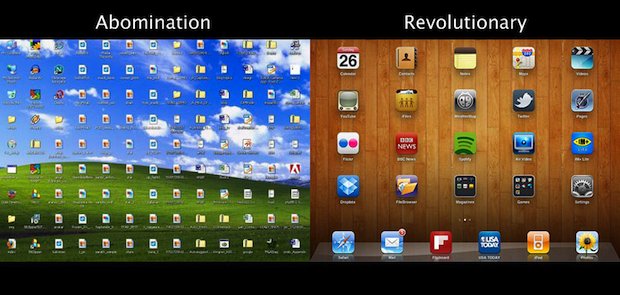
Most users today don't know what a file even is[1], and even in the 90s and 00s most users still didn't understand files. Ever seen a desktop filled with icons of all sorts because the user just dumps all their files there? I'm sure you have, and most users are like that. Navigating a file system and using it is fucking pig latin nonsense to them.
Couple that also with users not taking backups because it's an inconvenience (until they wish they had one), and cloud storage solves all the problems most users have had. They don't need to manage their files anymore and they're all backed up by the cloud provider; they don't need to worry about their konpoohters anymore as they go about enjoying their lives, if they even have a konpoohter at home at all anymore.
> Ever seen a desktop filled with icons of all sorts because the user just dumps all their files there? I'm sure you have, and most users are like that. Navigating a file system and using it is fucking pig latin nonsense to them.
First part I'd agree with: the second part I'm not sure, if only because of my experiences and frustrations of using MS OneDrive as part of my work's O365 integration: it unbelievably seems impossible to actually list all files in the web interface - I can only see "Recent" documents (which are documents I've viewed or opened, not new ones I've added), and I end up having to search to find new documents I've added (i.e. saved from Outlook, or scanned docs from printer), open them, and THEN I can see them in the main doc view.
Maybe I'm doing something wrong, but other colleagues have complained about the same thing, so I'm not sure...
> Local files are even easier to lose and even harder to search than cloud.
Not if you have your own NAS, and you can use programs like everything (1) for an easy quick search, and you are in control of everything not under someone else’s policy mercy.
I can answer the Rust question. In the ancient era, Rust source code was split into two types of files: .rc files and .rs files. The latter were "Rust source" files, and the former were "Rust crate" files. The crate files were essentially header files; they defined the public interface of the crate by explicitly listing items to be exported from the crate. Eventually explicit export lists were removed (and replaced with visibility modifiers on items themselves), and so there was no reason for .rc files to stick around, and nobody really ever objected to .rs as the now-universal extension for Rust files, since it's still a valid abbreviation.
Probably because the first release was in 1996, so Java never ran on a platform (like DOS) that needed only 3 characters. Originally it only ran on Solaris and Windows 95/NT.
Maybe I'm just an old curmudgeon but things like "you can use emojis as variables" (or in this case "the extension can be an emoji") scream amateur hour and a lack of seriousness to me. There's zero benefit, IMO, other than "it's quirky".
Which is a shame because the people who created Mojo are definitely not amateurs.
These things seem unrelated—experienced people are allowed to have fun too. I don't see how this correlates with lack of experience at all. This just speaks to your personal bias against having fun.
I looked through the mojo docs and it looks like the tech behind mojo might be great, but they have a really weird marketing strategy. So I'd like to believe that the emoji extension is the annoying marketing half of the really cool tech behind it.
Also valid in CSS class names. CSS modules, or one of the loaders in webpack, could be told to use them when munging class names [it's been a long time and I'm unsure of the webpack terminology and which one it was].
I used to write all my html files with .htm… apparently that went out of fashion.
Edit: I got my htm and html backwards and now comment not sense. Fixed now but obviously the folks below were right / responding to an earlier version.
I personally use .htm for anything that's an incomplete chunk of an HTML-ish document, like a Jinja2 template file, and .html for full rendered documents.
That way if I change my site infrastructure from, e.g. static html, to php, to mediawiki, to cgi-bin, to asp, to ruby on rails, all my URLs can stay the same (because cool URLs don't change) throughout, without containing misleading legacy baggage.
Isn't this something you can just configure at the server level, so you don't need to have your files be extensionless? I could swear I've done that before in apache.
> Isn't this something you can just configure at the server level
Oh, yeah. I mean, you have to configure the server to treat extensionless files as html/cgi/php/whatever anyway, so you could just have it load extensionless URLs from .html/.cgi/.php files, but I prefer to keep my server config as "surprise-free" as possible. If `/article/foo` is served from the file `$DOCUMENT_ROOT/article/foo` on the filesystem, I find that less confusing for everyone than if it's served from `$DOCUMENT_ROOT/article/foo.php`.
It's a matter of personal preference, for sure. Just like `.htm` over `.html`. (Or `.jpg` over `.jpeg` for that matter.) I wouldn't say the way I do it is "right", but it's a trade-off that works for me.
I guess I'll add to the pile of thoughts by saying that I think the parent comment was making a snide remark about .jsx/.tsx files, i.e "no one writes HTML anymore"
As a RapidSketch user on my organisations web ratings board working group living in a coastal area affected by soil erosion and with a penchant for DNA modelling, I find Rusts choice of file extension perturbing.
.rust.programming.language would make far more sense than pretending Rust will ever need to work in DOS.
Ah, but to make the 3 character limit matter, you need to have the source files on dos. So, it's not enough to compile a binary for dos, but one needs to run the compiler itself on dos!
You are not looking close enough. While Java source code has four characters in its file extension (.java), the output of its bytecode compiler has five characters in its file extension (.class).
Considering that Java needs a four-letter acronym (POJO) to describe value classes... I think a fancy acronym for fully spelled-out file extensions is in order.
I remember them on the DEC PDP-8 (I was taking classes at the high school part time in the 4th grade, the high school had one that had those big 8 inch floppy drives) and RSTS/E on PDP-11 early on (spent a lot of time with one at the high school in Milford one summer.) These were on CP/M, a microcomputer OS that was big on high end microcomputers from 1975 to 1985 or so that was the inspiration for MS-DOS which also had them.
This is also sort of a flame war topic for some. Divided primarily by those who believe the file’s content should contain the type (or be sampled to infer it) and those who prefer that the file’s name contain the type. More or less.
No, just an explicitly-defined metadata field. Inference would be worse than filename extensions (which are awful).
I think the original Mac OS fucked us all by implementing this pretty much perfectly in the 1980s, but using their weird HFS "resource forks" to do it so that it not only couldn't be implemented on other platforms, but also lent credence to the "ugh fuck it lets just mangle the file name... and then hide it~!!! wooo000!~!" argument..
¯\_(ಠ_ಠ)_/¯
UPDATE: My memory was faulty; the "what kind of file is this?" metadata was actually stored as per-file metadata, the "type" and "creator" fields in the HFS(+) filesystem.
Why are filename extensions awful? I find it incredibly useful to tell what kind of file something is by just glancing at it. Or do you envision tools like `ls` and file browsers also showing metadata at all times?
That reminds me of relying on static type inference so much that the code is hard to follow in Github and you need to pull it into your IDE just so you can keep track of the types as you read it.
While a filename extension could probably be superseded by file metadata, it's also nice when you can read the intention right in the name without additional tooling.
Especially when you consider a hypothetical world without filename extensions thus every UI shows the filetype next to the filename thus "readme.md" in our world is just "readme:md" in their world, and it's not obvious what was gained nor lost.
Yeah, I envision a future 1995 where not only does the GUI icon indicate what type of file it is, but the CLI tools also do (e.g. right before/after the "drwxr-xr-x@" or whatev)
When I type `ls`, I generally want to see file names and types, and nothing else. It would be really unfortunate to need a full `ls -l` to see file types.
In fact, I always want to see file types alongside their names, so I really don't mind that the two are together.
I think your imagination is failing you. The extension could be stored as a distinct field apart from the name. After all, we don't embed things like the file type (link, device, directory, etc) in the filename, nor things like the owner, group, ACL, access, creation time, etc.
Separately, what `ls` displays with or without switches would be independent of how the extension is stored. Say the extension were a distinct field, `ls` could still display that as `{filename}.{extension}` by default.
It's an accident of history that the extension is part of the filename.
>Separately, what `ls` displays with or without switches would be independent of how the extension is stored. Say the extension were a distinct field, `ls` could still display that as `{filename}.{extension}` by default.
But that would break piping the output of `ls` to other tools that expect a filename.
It's brittle and the output is designed for humans, not machine parsing.
Use a glob or find.
In a world where extensions were their own distinct metadata, whether or not to show them would be a switch to `ls` (whose output you shouldn't be parsing) and how to retrieve that metadata from a filename w/o parsing `ls` output would be something like:
ext=$(stat --format="%E" -- "$filename")
You'd also have a switch to `find` to select files by extension instead of having to pattern match their names.
This is a reasonable argument against parsing the output of `ls` within a shell script that you're going to save and reuse in arbitrary directories. It's not a reasonable argument against ever parsing the output of `ls`. If it were, it would also be an argument against humans reading the output of `ls`. The example in your first link makes its point by showing output from `ls` that the human reader can't parse. That doesn't demonstrate that the output of `ls` is "designed for humans, not machine parsing"; it demonstrates that in the general case, its output cannot be parsed by either humans or machines.
My rule is that it's ok to use `ls` only in a directory where you know the filenames aren't weird. That rule is the same regardless of whether a human or a computer will be parsing its output. In general, reusable shell scripts shouldn't make assumptions about their environment, so they shouldn't use `ls`; but piping `ls` to another command in a one-off manner at an interactive shell is fine if you know the filenames in the directory aren't weird, just like it would be fine to use `ls` at the same interactive shell and simply read its output yourself.
Instead they went with executables all having unique icons, and icons for non-executable files changing depending on which executable was last granted permission to open them.
I've learned in code not to rely on arbitrary user generated strings to designate the document type as they can be incorrect or non-existent. They're fine as a possibly unreliable indication to users, though.
Frustratingly NTFS has had proper metadata support for 30 years but FAT32 was a bag of rotten hacks, so Microsoft couldn’t fix this either even though their forward-looking OS had everything needed.
I know. I'm getting close to 50 years old, and I have lots of *COMPLAINTS!!!* about how various tech (Atari 2600 ~ iPhone 15 Pro Max) worked out.
But filesystems seem like the biggest species-level fuckup.
Windows had their shit, Mac had HFS then "HFS+" until... tbh, quite breathtakingly, like five minutes ago, When they finally introduced APFS. But like... no checksumming, just Mötley Crüe data integrity, it's all good, iCloud backups FTW amirite!?!
ZFS is good; I use it. But it didn't pan out, because a humanity-saving filesystem has to work on the systems humans actually use... (T_T)
Well, even Sun was wedded to the (shit-the-bed) CDDL, but before Oracle there was the sense that a one-off deal might be made.
Once Oracle bought Sun, it was like "Which is more important, your filesystem or your OS?"
Which isn't a hard question with regards to any filesystem I've ever used except ZFS. Seems insane to use anything else for long-term storage, unless it has some kind of high corporate budget.
Right, that was the original point that I was trying to make (but botched). The 80s Mac solved this near-perfectly, but then regressed to the current "just add a dot and some gibberish to the filename (and perhaps, or perhaps not, hide the gibberish and dot).
Because when you copy a file to some other system (e.g. USB drive, or email attachment, etc), only the common properties survive. So having a filesystem with awesome capabilities that the others lack becomes worse, not better. (T_T)
> Which are bad because those don't survive filesystem transmissions. A filename with extension will.
It won't actually because paths are not portable across file systems. The big reason is case sensitivity (and yes, some file extensions are case sensitive), but there's also issues with ASCII vs UTF-8 vs UTF-16 encoding.
Meanwhile there are multiple standards for exchanging file metadata between file systems (SMB, NFS, FUSE, FTP, whatever). Most of these support arbitrary metadata on files.
A path is not a filename. The filename is part of it. Even with encoding issues, the chances that a filename survives are still much higher than filesystem metadata.
For example: HTTP does not supply that metadata, so a file would lose it's "extension". Where would you store mimetype? Not in the file obviously.
There's actually quite a bit of metadata that needs to be preserved when moving files between filesystems (file type, permissions, atime/ctime/mtime). Modern file systems support extended attributes for regular files and you can copy files between file systems with xattrs without too much trouble these days.
In fact it's arguable that metadata is more reliable than file names, because that metadata is more standardized.
> For example: HTTP does not supply that metadata, so a file would lose it's "extension". Where would you store mimetype? Not in the file obviously.
Not sure what this point is. It's up to the HTTP serving application to determine what the mimetype of another file is however it needs to. A limited design could use file extensions, but a resilient design would just query the file system for unambiguous metadata. Like I said, there are multiple ways to do this.
There's a lot of stuff that's not "in" the file. Like it's name.
>There's actually quite a bit of metadata that needs to be preserved when moving files between filesystems (file type, permissions, atime/ctime/mtime). Modern file systems support extended attributes for regular files and you can copy files between file systems with xattrs without too much trouble these days.
Those are not hard requirements. It's nice to have, but in doubt it will just be what the destination filesystems think those values should be.
>There's a lot of stuff that's not "in" the file. Like it's name.
Correct. And everything not in the file is in danger of being lost. The filename (with extension) is the minimal viable data that has a chance to survive. The extension even more so than the basename.
I remember Mac OS 8 not having file extensions and it was very difficult to change a file's type. I believe hexedit was involved. Extensions IMO are way more reliable.
Apple type/creator was a superior metadata system for sure, but the UI was opaque for non-technical users. Paired with the modern "open with..." settings, it would still be better than how file extensions are used today.
For extra confussion, most files have the info in a header at the begining, but zip files have the info at the end, so someone made a file that is at the same time a valid .pdf and a valivalid .zip. (I can't find the link now.)
POC||GTFO does this with their releases, where the file released usually doubles as multiple file formats, and contains a ton of hidden messages all over the place. https://pocorgtfo.hacke.rs/
From the latest edition (#21):
> Technical Note: The electronic edition of this magazine is valid as both PDF and ZIP. Thanks to Ange
Albertini, it is also a PCAP-NG packet capture of an experiment by Yannay Livneh. See page 7.
Edit: Ah, and of course, Cosmopolitan (by @jart) that produces an amalgamation of formats bundled into one file (including ZIP) that runs across a bunch of OSes https://news.ycombinator.com/item?id=38101613
There also used to be an exploit where you could make a file both a valid .jar Java executable and a valid .gif, which back in the days of Java applets would potentially let you execute code when someone loaded your image (e.g. if you uploaded it as your profile picture): https://en.wikipedia.org/wiki/Polyglot_%28computing%29#GIFAR...
My favorite is storing a batch file uncompressed as the first entry in the ZIP archive, because you can rename it with .BAT or .CMD and run it. Sprinkle in some PowerShell and you can make a self extracting archive/installer.
Filenames are the worst place to store metadata. Even a file's specific metadata fields are not always trust worthy. In the realm of media assets, relying on the file's metadata is a giant footgun. I'm not even talking about anything malicious, as that's designed to attempt to fool people. I'm referring to simple mistakes which would cause incorrect processing down the line if solely depending on metadata. For example, marking the video field dominance as progressive when the content is truly interlaced or vice versa.
Even in the world of image uploading via browser, just checking extensions is discouraged. If the feature is that humans can be allowed to manipulate it, it must be sanitized/verified before accepting. This isn't just for text heading for a database.
Where's the best place? It seems like being able to send a file handle to an app without having to open the file nor read a sidecar/db could be quite convenient?
the problem with depending on metadata alone is just an error prone concept. this could matter more or less depending on the use case. telling a text editor that a plain text file is rich text is much less problematic than telling a video app that a file is 16x9 when it is actually 4x3. saving a tab delimited file as CSV is also going to cause issues if only the extension is used.
i'm not saying throw away extensions, as they are great hints, but trust without verifying is not just for politics.
The problem with declaring a file's type in the content itself is that you end up rendering all prior file formats obsolete because they lack this information.
The better solution I've seen proposed is to store file type information as metadata in the filesystem itself, but this would lead to compatibility problems with archiving tools and any other scenario where a file is moved between differing file systems.
File extensions are the best way to make determining a file type easy without parsing the whole thing while also maintaining cross and backwards compatibility.
It's getting less relevant as regular users stop using the filesystem directly and instead rely on proprietary services for their data. Google Drive doesn't rely on file extensions. Though for all I know, Microsoft's web stuff does...
What's the web equivalent of using a floppy disk to move data between Mac, OS and Windows, I wonder. Downloading to the local computer and uploading, presumably. I guess that is pretty equivalent. Though you can't even download the native representation of a Google (text, spreadsheet, ...) document.
Having files double as a launcher for some program was a mistake, the result of which is that we not how have to sit through those awful trainings about not clicking untrusted files.
Just open the program first.
People should fear untrusted programs, but should be at ease viewing data through programs that they trust.
I guess I'm not in a good position to judge how annoying it would be for others. I can't remember the last time I let the OS
decide how to handle a file type.
As for (2)... good. Asking your computer to perform actions that you understand so poorly that you can't figure out what program is going to run is a recipe for disaster. That's the behavior we should be training people to avoid, not merely engaging with suspicious data but doing so recklessly.
I understand computers plenty well, but I can't envision any scenario where not knowing the default program for a file type would bring disaster. No one should have to memorize what program opens every file, and there's no good way to even learn that information easily. I want to open a photo. Why would I care whether this system uses Shotwell or GNOME Photos or what have you? How would I even learn what's possible? Especially with Linux, there's so much fragmentation that just trying to open the file manager feels like a guessing game of going through all the ones I've heard of to see which works until I finally break down and Google what fork this distro uses.
That change would make computers completely unusable beyond Chrome and maybe Office for 99% of people.
I'm not the pen tester, I just hang out with him, but the particular disaster I'm thinking of has to do with samba file shares. I guess there's some file extension that will prompt windows to attempt to log in to the server at an address found in the file. So you email that file to your target and when they open it it sends you their password under the auspices that you're an internal samba file share.
As I understand it, a very large portion of the attacker's toolkit has to do with tricking users into running programs they've never heard of by clicking things they think are familiar.
But the real disaster is not the successful attacks, it's the culture that we're creating where users are taught to click things and trust the OS default behavior while simultaneously trained to never click things that seem out of the ordinary.
It creates a paralysis in the user when it comes to exploring their tooling and fails to create a learning gradient. This widens the gap between them and people like you and me.
That's a disaster for them because they get taken advantage of by people in the know, and it's a disaster for you and me because they end up blindly supporting bad behavior (drm, companies mishandling user data, etc) since it's bad in a dimension that they've been locked out of by our failure to pave a path towards competence.
You certainly will care if you double click a .png and suddenly WinRAR opens up, because that .png is actually an ACE archive (application/x-ace-compressed), and guess what ACE stands for - arbitrary code execution! Probably not, but they've had one for 20-ish years: [1]
I find that insane, and that's basically what happens on Linux today.
If it's a .png, it would open up in Microsoft Photos/eog/LXImage for me. Obviously some exploit could be found in there and any untrusted file is a risk, but it won't open WinRAR. That's the whole point of why file extensions are so much better than any alternative.
What happened to me today on Linux was `$ geeqie image.png`. It might be possible to trick geeqie into doing something bad, but it's a heck of a lot harder.
All programs become untrusted after they reach a certain size. It's highly unlikely that a 1,000,000 line monstrosity with a file format so complex no single human can understand has no exploitable flaws in its file handling.
With "open by extension" the .pdf file can only target vulnerabilities in my PDF reader, but with "open by mimetype" they could be trying to exploit any program that is configured to open files. If you're doing "open by extension" and know that Adobe's exquisite PDF reader will open when you double click a PDF, doing so is not more unsafe than opening up Reader and navigating to the file from within.
That's without mentioning the main obvious advantage of "open by extension" - the fact that I can configure programs that open file formats that haven't been blessed by whoever wrote your `file` utility.
IIRC my KDE has little icon overlays, so a traffic cone on the mp4 preview image or mp4 icon. That seems like a nice way to give that information. But, it's using magic numbers.
A string->string table is not that difficult to get right, I've never been surprised by what happens when I open a file in Windows. I could write 10 paragraphs on the thought process which my Linux install goes through as it decides that when I click a .zip file the correct behavior is to open it in Chromium and immediately download it to ~/Downloads.
For those embroiled in this holy war there has come a mediator that has quelled the discord and brough harmony and his name is Doom, Doom Emacs
(Seriously if you've been a vimmer for a while and wanted to give emacs a go give Doom Emacs a try and drop hlissner a couple of bucks it's definitly worth it)
It was called SOS on the Apple ///, originally Sara's Operating System but officially Sophisticated Operating System. It was a very advanced OS for its time, most notably one of the first to include a useful driver model.
The SOS filesystem was reused for ProDOS (and later GS/OS as well), but a lot of the advanced features were removed for ProDOS due to wanting to fit into the smaller RAM of the Apple ][.
I think almost all Apple apps do this, e.g. Photos.app.
Which is super-annoying, even though I agree with in in theory. But generally the only reason I am writing an image to .jpg is to email it to somebody or upload it to some web app and that principled .jpeg filename extension certainly isn't helping compatibility..
Makes for an intriguing concept in a tv show set in an alternate universe (Fringe?), where file extensions are not in the name but in the attributes of the file.
Using file extensions (or having to open the file and inspect contents) to determine file type is a slow way to find files. If you have one of the newest hard drives that is capable of storing 100M+ files on it (or a NAS made up of multiple, smaller drives); then it can take forever to find all files of a certain kind (e.g. photos, documents, etc.).
Just try to write a program that lists all your photos. You have to know all the various extensions that apply to still images (.jpg, .jpeg, .gif, .png, etc.) and do a string comparison against every file in the drive hierarchy. Might as well go to lunch waiting for it to finish if you have many millions of files to search.
This was the primary reason why I set out to build a better system that could scan through hundreds of millions of files and find all that matched a given subset in just a few seconds. https://www.Didgets.com
Apparently, your experience with various indexing services has been different than mine. I found it is just too easy for the index to become 'out of sync' with the actual file system and has to be occasionally rebuilt. Even with just 1M files, that always took a long time; but with 100M+ files?? If the storage was removeable or if you booted occasionally with another OS (or even just a different version of the same OS) then I found it was near impossible for an indexing service to keep track of all the changes.
We usually can use file extensions to differentiate files that otherwise share the same name. I once worked on a VAX mainframe OS that to my surprise supported completely duplicate filenames including extension!
Tangentially related: I find it weird that relating file extensions to GUI document icons still doesn't work intuitively.
On my Mac, the document icons for file types still correspond to whatever program I've chosen to open that extension type by default.
Which is so strange -- an .mkv file isn't a VLC document; an .mp4 file isn't a QuickTime document, an .mp3 file isn't an Apple Music document, a .jpg isn't a Preview document, and a .tiff isn't a Photoshop document. What the heck?
I wish the OS would just define reasonable, attractive, default document icons for every standard file type, that applications couldn't control/overwrite. Reserve application-defined document icons just for those apps who truly have their own proprietary file format (e.g. .psd or .docx).
I always liked the Classic macOS way for using "File Type" and "File Creator" meta data. File extensions were not used at the operating system level, but were useful for cross-platform sharing or as away to organize file.
The file icon would be assigned by the "Creator" Application. Double-clicking the file would cause it to be opened by the "Creator". You could choose to open a file with anything that advertised that it could work with a "File Type". There were utilities to change the "File Creator".
It was also a royal pain in the ass to change the file type should you want to open the same file with another application, edit it, save it, then go back to the 1st application.
At that point I assume it's easier to open the file from each application rather than the finder. Which I appreciate isn't a great workflow, but probably simpler in that worldview.
On MacOS of that era, the files didn't even show up in the "Open..." dialogs of those other apps. Many of those apps didn't have a "Show all files" option.
Isn't iOS still essentially the same way? It was one reason I stopped using iOS devices as I frequently wanted to open, for instance, pdf or image files from multiple apps.
Does IOS even have a file system? Last time I used it, I had to share files back and forth from one app to others just to open them. It was really annoying...
I have the opposite preference... I want to know if my OS is going to open a PDF in Preview or it was hijacked by Adobe again, or if a .cfg file is going to open up in some useless Microsoft System Configuration app, or a JSON file is gonna open up my super bloated IDE instead of a text editor.
It's an additional piece of information, rather than just mirroring what the extension already tells you.
I'm surprised people are adverse to this on here. Having both the extension and the graphical icon convey the same information is redundant and wasteful.
It's way easier to recognize an icon at a glance, rather than scan the filename to locate and read the extension.
And the application icons are often super ugly, and often don't distinguish between the filetypes anyways.
Honestly, I'd rather do away with default application handlers altogether, if I've got multiple apps installed for a file type. Every time I double-click on a .jpeg, just ask me if I want to open it in Preview or Photoshop. When it's a .pdf, ask me about Acrobat or Preview. When it's an .mp4, ask me about VLC or QuickTime.
I have different reasons for wanting to use a different app each time (do I want to consume or edit, and edit how?), and trying to remember which one is the default handler and when I need to pick the non-default one is cognitive load I don't want to deal with.
Especially since the application-specific icons also sometimes don't even always make it clear which app it is. E.g. the IINA player assigns its own dedicated icons to video files, but you'd never guess that they open IINA.
Just give me standardized icons that are recognizable at a glance, and let me pick the application I want to use at the moment.
That's how it generally works under Linux desktop environments - there are generic icons based on file type no matter what application is used to open them.
> Which is so strange -- an .mkv file isn't a VLC document; an .mp4 file isn't a QuickTime document, an .mp3 file isn't an Apple Music document, a .jpg isn't a Preview document, and a .tiff isn't a Photoshop document. What the heck?
Aren't they? Most of these tools can open many specific types of documents, so you might want to know if a document is a movie or a picture in addition to what program will open it.
And of course there's the issue that Preview is actually an editor.
I share your pain. Luckily there are great apps out there (I use IconChamp[1]) that let you take full control of any given extension's associated icon, among other cool things. If your point is more purely about Apple's stance, then I extend a hearty "hear hear".
I think it is intuitive, the icon indicates which application you are opening. If I want to know which file type it is, I turn on 'show file extensions'.
Well, GNU/Linux, as such might not, but the various desktops that run atop it most certainly should care.
Re: ACK! THBBFT!: Just my personal ode to Bloom County which I feel must certainly be regarded as the greatest comic strip ever. (I need to wait for others to start coming on board with the project before I worry about doing things for any other reason than pure self-amusement.)


[0] where different use cases might be satisfied by e.g.
If you have any resources on this topic off the top of your head I'd appreciate it if you shared them